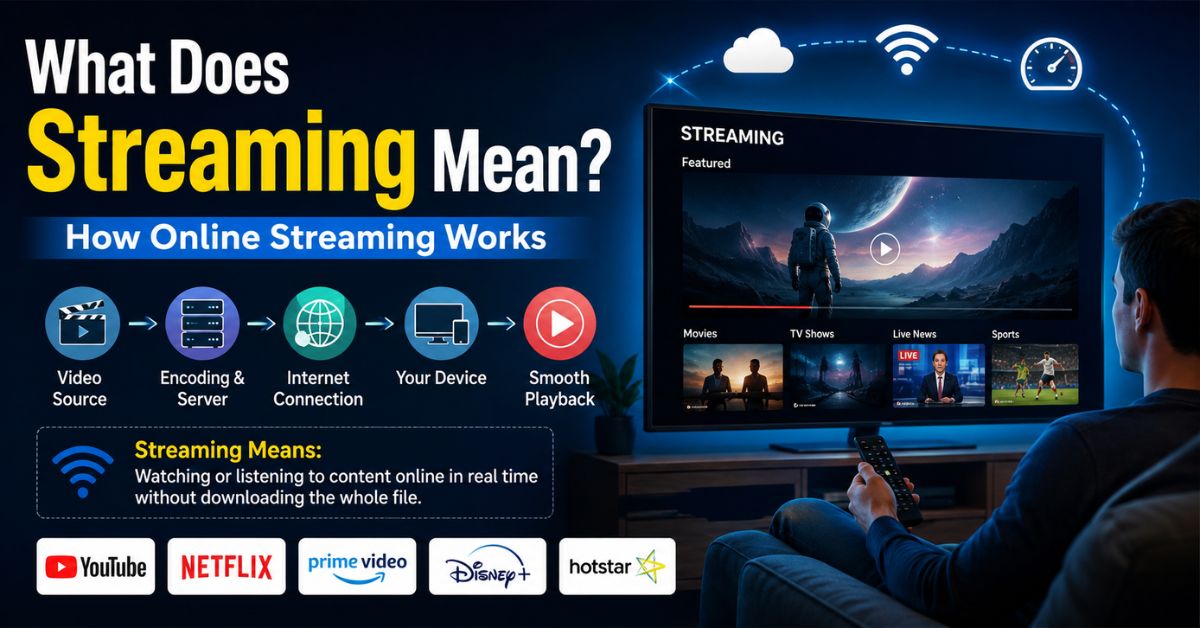
What Does Streaming Mean? How Online Streaming Works
If you’re wondering What Does Streaming Mean, it refers to watching, listening to, or using digital content over the internet without first downloading the entire file to your device. When you watch a movie on Netflix, listen to music on Spotify, play a YouTube video, or use a cloud gaming service, you are streaming. The content begins playing as data arrives, giving you fast access across phones, computers, tablets, smart TVs, and gaming devices.
So, What Does Streaming Mean in simple terms? Streaming means receiving audio, video, or gaming data continuously over the internet so you can use or watch it without first saving the complete file permanently to your device. Small portions may be temporarily buffered to keep playback smooth, but traditional streaming does not require you to store the entire movie, song, broadcast, or game before starting it.
What Does Streaming Mean?
Streaming is a method of delivering digital media from a remote server to an internet-connected device in a continuous flow. Instead of transferring the complete file before playback begins, the streaming service sends enough data for your device to start playing quickly. More information continues arriving while you watch or listen, which is why a two-hour movie can start within seconds rather than requiring a full download first.
If you are wondering What Does Streaming Mean in everyday life, think about opening a song in Apple Music or pressing play on a YouTube video. You do not normally receive a permanent copy of the entire media file. The service delivers the information as you need it. Streaming is now commonly used for movies, television, music, podcasts, radio, sports, live events, video calls, and cloud gaming.
Common examples include:
- Watching movies or TV shows on Netflix or Disney+
- Playing videos on YouTube
- Listening to music on Spotify or Apple Music
- Watching a live creator on Twitch
- Streaming live sports through an online service
- Using Xbox Cloud Gaming or GeForce Now
- Listening to internet radio or podcasts
How Does Streaming Work?
When you select streamed content, your device sends a request through the internet to the service hosting it. The server delivers the media as small pieces of digital information commonly called data packets. Your streaming app or web browser processes these packets in the correct order and converts them into the picture and sound you experience. Additional packets continue arriving while the content is playing.
Your device normally keeps a small amount of upcoming content ready before you reach it. This temporary reserve is known as a buffer. If your internet connection remains fast enough, playback continues without interruption. If data begins arriving too slowly, the buffer can run out, causing the video or audio to pause while the player receives more information. This temporary interruption is what people commonly call buffering.
A simplified streaming process looks like this:
- You choose a video, song, game, or live broadcast.
- Your device requests the content from a remote server.
- The server sends media data over your internet connection.
- Your device temporarily buffers a small portion.
- Playback begins before the complete content has arrived.
- More data continues arriving while you watch, listen, or play.
The process happens rapidly, so users usually notice only the finished video, audio, or gaming experience.
Streaming vs. Downloading: What Is the Difference?
The easiest way to understand What Does Streaming Mean is to compare streaming with downloading. A traditional download transfers a complete file to your device and stores it locally. Once the download finishes, you can usually open that file without continuously accessing the internet. Streaming instead delivers content gradually and normally depends on an active connection throughout most or all of the viewing or listening session.
Streaming offers fast access and saves permanent storage space, while downloading can be useful when internet access is unreliable or unavailable. Many modern streaming platforms also offer an offline download feature. In that situation, the service temporarily stores authorized content on your device for later viewing. Although the same app may provide both features, offline downloading and real-time streaming are technically different methods of accessing media.
| Feature | Streaming | Downloading |
|---|---|---|
| When playback can begin | Usually within seconds | Traditionally after enough or all of the file downloads |
| Permanent file required | No | Usually yes |
| Internet needed during playback | Usually yes | Often no after download |
| Local storage use | Relatively low | Higher |
| Buffering possible | Yes | Usually not after download |
| Best for | Instant access | Offline access |
Streaming is generally more convenient for immediate entertainment, while downloading is helpful when you want reliable offline access.
What Are the Main Types of Streaming?
There are two major forms of media streaming: on-demand streaming and live streaming. On-demand services store prerecorded content on servers and let you choose when to begin. You can usually pause, rewind, fast-forward, or replay the content. Movies on Netflix, songs on Spotify, recorded YouTube videos, and podcast episodes are familiar examples of on-demand streaming used by millions of people every day.
Live streaming delivers content as an event happens. A sports match, gaming broadcast, concert, news event, webinar, or creator livestream can be transmitted to viewers with relatively little delay. Unlike on-demand media, viewers cannot always skip ahead because future portions of the event have not happened yet. Some services allow viewers to pause or rewind a live stream by temporarily storing recent parts of the broadcast.
| Streaming Type | How It Works | Common Examples |
| On-demand video | Plays prerecorded video when requested | Netflix, Disney+, YouTube |
| Music streaming | Delivers songs and audio on request | Spotify, Apple Music |
| Live streaming | Broadcasts an event in near real time | Twitch, live sports, webinars |
| Cloud gaming | Streams game output from remote servers | Xbox Cloud Gaming, GeForce Now |
| Internet radio | Continuously broadcasts audio online | Digital radio services |
Cloud gaming is a particularly interesting form of streaming because much of the game processing happens on remote computers rather than entirely on the player’s device.
What Do You Need for Smooth Streaming?
A reliable internet connection is one of the most important requirements for streaming. Higher-quality content contains more information, so high-definition and 4K video usually require more bandwidth than standard-definition video or music. Your experience can also depend on Wi-Fi signal strength, network congestion, your device, the streaming platform’s servers, and how many other devices are simultaneously using your internet connection.
If you understand What Does Streaming Mean, buffering also becomes easier to troubleshoot. Your player needs to receive data faster than, or at least as quickly as, you consume it. When your connection cannot keep up, playback may pause or the platform may automatically lower picture quality. Many modern services use adaptive bitrate streaming, which adjusts video quality according to available bandwidth to reduce interruptions.
How Much Data Does Streaming Use?
Streaming can consume considerably more internet data than ordinary web browsing because audio and video files contain large amounts of information. Video resolution makes a major difference. Standard-definition content generally uses less data than HD, while 4K video can consume several gigabytes during a long viewing session. Music streaming normally uses much less data than video, although higher audio-quality settings increase consumption.
For people with unlimited home internet, data consumption may not be a major concern. It matters more when using cellular data or an internet plan with monthly limits. Streaming several hours of high-resolution video can quickly reduce a mobile data allowance. Most major streaming applications therefore provide settings that let users reduce picture or audio quality, restrict cellular streaming, or download selected content over Wi-Fi for offline use.
Approximate usage varies by platform and quality settings, but these categories show the general pattern:
| Activity | Relative Data Usage |
| Music streaming | Low |
| Standard-definition video | Moderate |
| HD video | High |
| 4K/UHD video | Very high |
| Cloud gaming | High and continuous |
| Audio podcast streaming | Low |
To control data usage, lower streaming quality when using mobile data and save high-resolution viewing for Wi-Fi whenever practical.
Conclusion
What Does Streaming Mean? It means receiving digital content continuously over the internet so playback can begin without waiting for an entire file to download. Streaming powers many everyday services, including online video, music, live broadcasts, podcasts, sports, internet radio, and cloud gaming. Data arrives in small portions while your device processes and plays it, often using a temporary buffer to maintain smooth playback.
Streaming offers convenient, nearly instant access to enormous libraries of digital content, but the experience depends heavily on connection quality and available bandwidth. Understanding the difference between streaming and downloading, the purpose of buffering, and the impact of video quality on data usage can help you choose better settings and troubleshoot problems whenever your favorite content does not play smoothly.