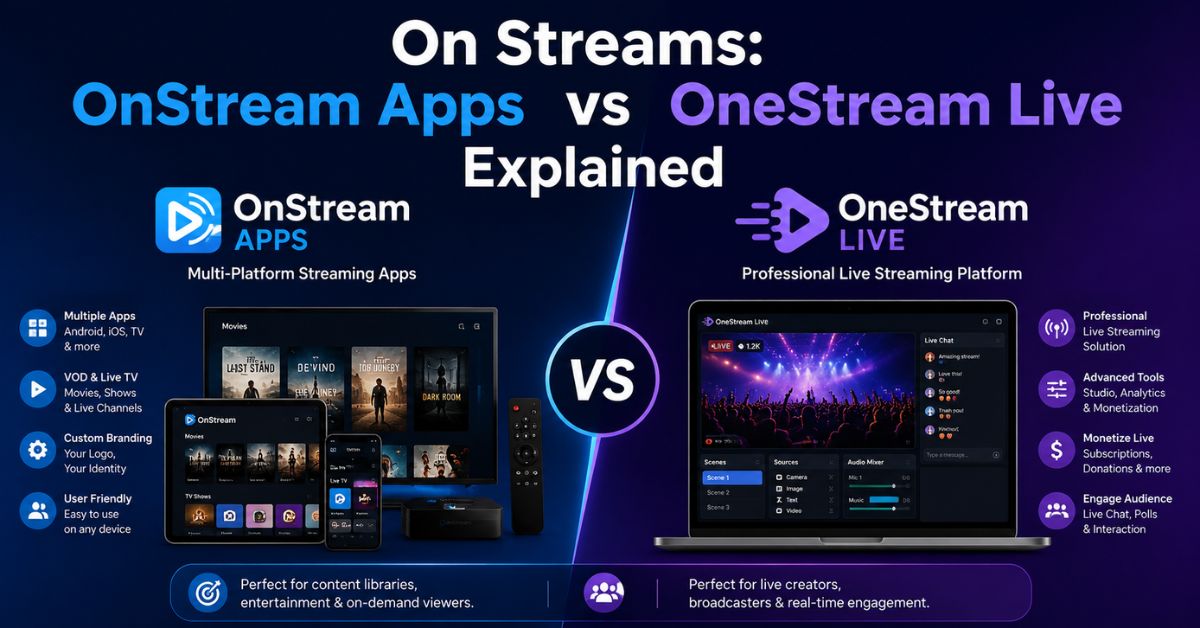
On Streams: OnStream Apps vs OneStream Live Explained
Searching for On Streams can be surprisingly confusing because the points to several unrelated ideas. You may be trying to understand an industrial term, find an entertainment application, watch movies through ON Stream, or broadcast video to several social networks. Similar names such as OnStream, ON Stream, and OneStream Live make it easy to open a page for a completely different product than the one you intended to find.
The key is to identify what you want to accomplish before installing an app or creating an account. Some services are designed for watching or displaying video, while others help creators distribute live broadcasts. The phrase also has a traditional business meaning that has nothing to do with online entertainment. This guide explains those differences clearly so you can understand the most common on streams search results and choose appropriately.
What Does “On Streams” Mean?
In business, manufacturing, energy, and industrial settings, “on stream” means that a facility, process, machine, or service has entered operation or become available for use. A company might say a new production line will “come on stream” next month. Major English dictionaries recognize this operational meaning, particularly when discussing factories, equipment, production systems, and new capacity.
Online, however, people searching on streams are often looking for something related to digital video. That could mean an OnStream app, movie streaming, live broadcasting, or a tool for sending one broadcast to several platforms. Understanding search intent matters because the services associated with these names are not interchangeable. One may play managed video on a television, while another may help a creator simultaneously broadcast to YouTube, Twitch, Facebook, and other destinations.
Common meanings at a glance
| Search term | Typical meaning | Main purpose |
|---|---|---|
| On-stream | Business or industrial term | A system becomes operational |
| OnStream | Name used by video-related apps | Video playback or content display |
| ON Stream | AXION-related entertainment service | Movie access and rewards |
| OneStream Live | Multistreaming platform | Broadcast to multiple destinations |
What Is OnStream?
OnStream can refer to more than one video-related product. A current Google Play listing named OnStream describes an Android TV content player designed for managed screens. Its listed features include device pairing, scheduled-content synchronization, video playback, and an interface optimized for large Android TV displays. That makes it different from a traditional consumer movie subscription service.
There is also ON Stream from AXION Energy, an entertainment platform associated with the ON rewards ecosystem in Argentina. Its Google Play description states that users can access movies using vouchers obtained through purchases, ON coins, or participating AXION service stations. The service supports Android devices, including phones, tablets, and Android TV.
Other websites may also use the name “OnStream APK” when discussing Android, FireStick, or Smart TV entertainment applications. Because similarly named apps can come from unrelated developers, users should verify the developer, official website, permissions, content licensing, and download source before installing anything.
Useful checks include:
- Confirm the exact developer name.
- Compare the package or app-store listing.
- Review requested Android permissions.
- Avoid modified or unknown APK files.
- Check whether the content provider has distribution rights.
- Keep Android, Fire TV, or Smart TV software updated.
What Is OneStream Live?
OneStream Live serves a very different audience. It is a cloud-based live streaming and multistreaming platform built for creators, businesses, educators, gamers, organizations, and other broadcasters. According to its official website, the service can distribute real-time or prerecorded video to more than 45 social platforms and web destinations.
Rather than functioning mainly as a movie-watching application, OneStream Live helps publishers manage broadcasts. Users can create streams from a browser, schedule prerecorded content, operate a live studio, connect multiple destinations, and manage audience interactions. It can also work with external streaming software, which makes it useful for creators who need more control than a simple mobile livestream provides.
Popular OneStream Live capabilities
- Multistreaming to multiple social networks
- Browser-based Live Studio
- Prerecorded video scheduling
- Website video embedding
- Unified live chat
- Stream recording
- Team collaboration
- Custom RTMP destinations
OneStream Live also supports external encoders such as OBS Studio through RTMP workflows. Its multistreaming documentation explains that broadcasters can connect external encoders and distribute streams to numerous destinations from one setup.
OnStream vs OneStream Live
The biggest mistake readers can make is assuming OnStream and OneStream Live are two versions of the same service. They are not. Current OnStream listings focus primarily on video playback or managed content, while OneStream Live focuses on creating, scheduling, and distributing broadcasts. The right choice depends entirely on whether you want to consume or display video, redeem entertainment content, or publish your own live stream.
For example, a business displaying scheduled promotional videos on Android TV may be interested in an OnStream content-player solution. A creator who wants one OBS Studio broadcast to appear on several social platforms would instead investigate OneStream Live. Someone using AXION Energy’s ON rewards system in Argentina may mean ON Stream, which is another separate service altogether.
| Feature | OnStream Content Player | ON Stream AXION | OneStream Live |
| Main purpose | Managed video playback | Movie entertainment | Live broadcasting |
| Android support | Yes | Yes | Yes |
| Smart/Android TV focus | Yes | Yes | Possible through supported workflows |
| Movie library | Not its primary function | Yes | No |
| Multistreaming | No | No | Yes |
| OBS Studio support | Not the core purpose | No | Yes |
| Custom RTMP | Not the core purpose | No | Yes |
| Creator-focused tools | Limited | No | Yes |
How to Choose the Right Streaming Option
Start by defining what you actually want to do with on streams technology. If your goal is watching movies, investigate a legitimate entertainment platform and confirm that it operates in your region. If you need scheduled video displays on Android TV, a managed content player may fit better. If your goal is broadcasting your own video to several networks, look for a dedicated multistreaming service instead.
You should also consider your hardware and workflow. Android phone users may have different requirements than FireStick, Smart TV, desktop, or professional OBS Studio users. Broadcasters should examine supported destinations, video quality, RTMP capabilities, scheduling, recording, and audience-management tools. Viewers should focus more on availability, content licensing, supported devices, account requirements, playback quality, and privacy.
Quick selection steps
- Decide whether you want to watch, display, or broadcast video.
- Identify the exact product and developer.
- Confirm that your device is supported.
- Check whether the service works in your country.
- Review pricing, rewards, subscriptions, or account requirements.
- Check privacy, permissions, and content rights.
- Install software only from a source you trust.
Best fit by use case
| Your goal | What to investigate |
| Broadcast to several platforms | OneStream Live or another multistreaming tool |
| Use OBS Studio with multiple destinations | RTMP-compatible multistreaming platform |
| Display managed content on Android TV | OnStream-type managed content player |
| Redeem AXION rewards for movies | ON Stream / ON AXION ecosystem |
| Watch entertainment on a Smart TV | Licensed services supported by your device |
Staying Safe When Using Streaming Apps
Safety matters especially when an OnStream APK or similar application is distributed outside major app stores. APK files can be useful for legitimate software distribution, but installing apps from unfamiliar sources adds risk because the store’s normal review process may not apply. Before sideloading an application onto Android, FireStick, or another device, confirm who publishes it and why an official store version is unavailable.
Content rights deserve the same attention. An application offering a large catalog of recent movies at no apparent cost is not automatically illegal, but users should verify how the service licenses and distributes that material. A VPN can improve connection privacy in some situations, but it does not make unauthorized content distribution lawful. The safer approach is to use services with identifiable operators, transparent policies, and legitimate distribution arrangements.
Conclusion
The on streams can describe several completely different things, which is why search results may initially seem inconsistent. In business language, “on stream” usually means becoming operational. In digital media, OnStream may refer to video-player products, while ON Stream is associated with AXION Energy’s entertainment ecosystem. OneStream Live, meanwhile, is designed primarily for creators who want cloud-based live streaming and multistreaming capabilities.
Before choosing a service, verify the spelling, developer, purpose, device compatibility, geographic availability, and content rights. That simple process can prevent you from confusing one platform with another or installing an unrelated application. Whether your goal is Android TV playback, movie access, OBS Studio broadcasting, custom RTMP streaming, or simultaneous social broadcasting, understanding the different meanings behind on streams will help you reach the right solution faster.